RESOURCES & SUPPORT
Tech Support
Everything you need to get the most out of your R&S Water Service equipment — troubleshooting guides, filter change instructions, and downloadable brochures.
How to Change Your Filters
Regular filter changes are essential for keeping your reverse osmosis system performing at its best. Most filters should be replaced every 6–12 months depending on your water usage and local water quality.
Turn Off the Water Supply
Locate the feed water valve (usually under the sink) and turn it off. Then open the RO faucet to release any remaining pressure in the system.
Remove the Filter Housings
Use the filter wrench (included with your system) to unscrew each filter housing. Have a small towel ready to catch any residual water.
Replace the Filter Cartridges
Remove the old cartridges and discard them. Insert the new cartridges — make sure each one is seated firmly and oriented correctly.
Reassemble and Flush
Hand-tighten the housings back into place. Turn the water supply back on and let the system run for 10–15 minutes to flush the new filters before drinking.
Understanding Your Control Panel
Your system may come with either a 3-button or 5-button control panel. Use the images below to identify your panel and understand the indicator lights.
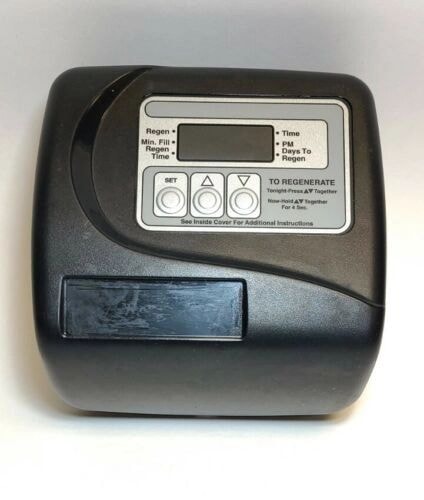
3-Button Control Panel
To set the time, press the Set button and hold it until just the hour is flashing. Use the Up or Down button to adjust the value. Watch for a PM indicator on the right-hand side when in the evening hours. Once the hour is set, press the Set button again and use the Up or Down button to change the minutes. Once the minutes are set, press the Set button one more time — the clock will stop flashing. To start a manual regeneration, push the Up and Down buttons together until the cycle starts. Do not use the water in the house until all cycles are complete.
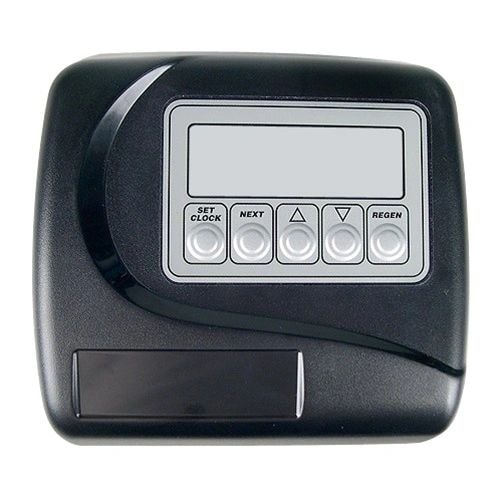
5-Button Control Panel
To set the time, press the Set Clock button and hold it until just the hour is flashing. Use the Up or Down button to adjust the value. Watch for a PM indicator on the right-hand side when in the evening hours. Once the hour is set, press the Set Clock button again and use the Up or Down button to change the minutes. Once the minutes are set, press the Set Clock button one more time — the clock will stop flashing.
Regeneration options:
- Immediate regeneration — press and hold the Regen button until the first cycle starts. Release the button and do not use the water until all 5 cycles are complete.
- Delayed regeneration — press and immediately release the Regen button. It will display "Regen Today" in the lower left-hand corner. Regeneration will begin at the programmed time.
Protect your systems from freezing.
Common Troubleshooting
My RO system is producing water slowly.
The system is making a gurgling or draining noise.
Water from my RO faucet tastes different than usual.
There is water leaking under my sink.
The UV lamp indicator light is red.
My tank is full but water pressure at the faucet is low.
Scan for More Resources
Scan the QR code below with your smartphone camera to access additional product documentation, installation videos, and support resources.
Still Need Help?
Our team is happy to walk you through any issue over the phone or schedule a service visit.